Welcome to the University of Delaware Library's Student Multimedia Design Center blog, sharing tips and links for multimedia creators and users. Come visit us in person on the lower level of the Morris Library or online at www.lib.udel.edu/multimedia.
There's a new fundraiser around the Newark, DE area that will be launched during the week of September 30th, 2013. That new fundraiser is called Walk Away From Cancer that will be
supported by
Cancer Care Connection (www.cancercareconnection.org), a Newark-based,
non-profit counseling and information service for people affected by
cancer. If you think you go the design skills to make a smashing poster, go for it!
support
Cancer Care Connection (www.cancercareconnection.org), a Newark-based,
non-profit counseling and information service for people affected by
cancer - See more at:
http://walkawayfromcancer.kintera.org/faf/home/default.asp?ievent=1082863#sthash.bcZTpU5f.dpuf
With the emergence of HDMI 2.0, a lot of questions arose regarding if there would be additional parts required to enhance the viewing experience. Fear not, for HDMI 2.0 does not require you to empty your wallet and buy those new cables/connectors you were dreading. Just sit back and relax, because enjoying this new level of HDMI is undeniably easy if you remember the following:
HDMI 2.0 can handle up to 18 gigabytes per second. That means 12 bit color along with 60 frames per second.
You have access of up to 32 audio channels. That means a lot of surround sound.
Your old HDMI cables will work just fine due to the backward compatibility 2.0 has to offer.
You can now stream two video streams on the same screen. For video game users, this one is a huge plus.
Feeling adventurous? Try out using the split-view signal to play on multiple screens, making for a cool effect in any room.
If you are a Sony 4K television owner, your experience just became a lot easier. By the end of 2013, a simple download will allow HDMI 2.0 to run on your television.
Products that support HDMI 2.0 will be in stores as soon as Winter 2013.
Hate losing your remote controls? Or do you forget which one works what? Well pretty soon, only one remote control will be required to operate your TV all thanks to CEC, the protocol that allows one connected device to control another and vice versa.
Although an Ultra HD TV may not be a part of everyone's budget, the possibilities HDMI 2.0 has to offer make the investment seem worth it. While technology is forever changing, the cables you will need to enjoy this experience are not.
If you're interested, or have been looking for a job in an interactive field, then you may have come across the two terms User Interface Designer and User Experience Designer. But what's the difference?
Key Roles of a User Interface Designer:
Focuses on the look and feel of a site, app, program, etc.
Branding such as logos, colors, typography
Manages the visual appeal
Key Roles of a User Experience Designer:
Focuses on the journey the user will esperience
In charge of the site architecture, page layouts, actionable items for each page
Physiological aspect
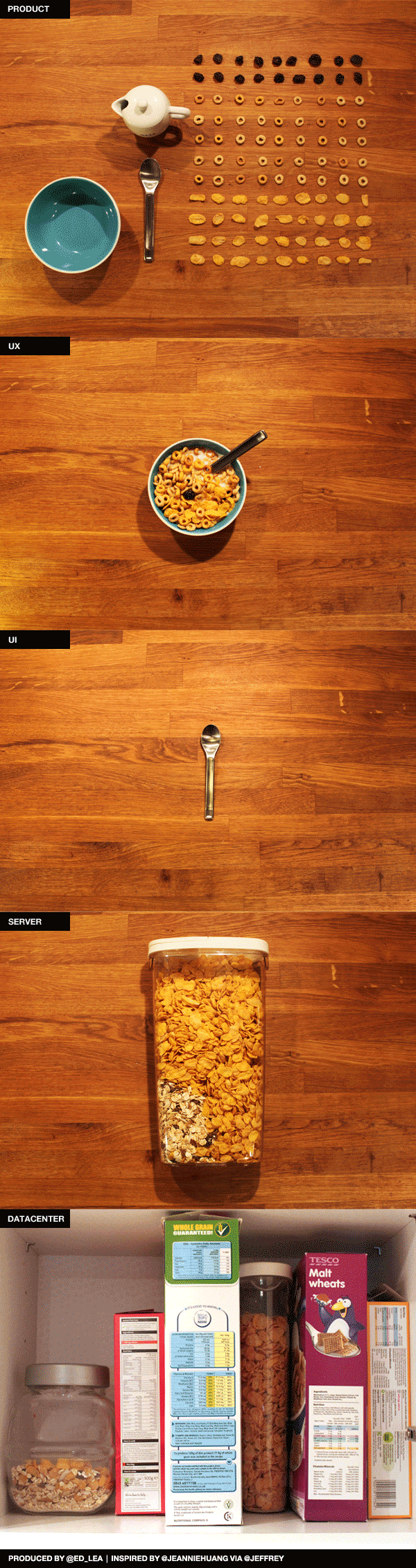
If you're still not clear on the differences, maybe this infographic will help.
When you use Studio 6, one of the first things you see on the mixer is the slip of paper telling you what settings to keep each control knob at. The very first one at the top is the black knob labeled gain.
Some people think that gain controls the "volume" of the microphone. It
doesn't. "Gain" is actually an electrical term used to describe the
amount of amplitude (i.e voltage/currant/power) of the audio signal
being sent into the mixer. Gain measures the ability of the electrical
circuit to increase the power or amplify the signal from the input (mic)
to the output (your Digital Audio Workstation). If you feel like
Wikipedia'ing it to read more, you can continue to scratch your head while looking at all
the amazing formulas that are used to express gain!:
Yea....no.
Basically,when you play with the gain knob, what you're actually doing is determining how much signal is flowing from the mic, through the mixer, and into the computer - in this case, Sound Waves that have been turned into electrical sine waves. This is why if you turn the gain down really low, you don't visually see as large of a sound wave in your digital audio workstation (i.e. Audacity, Garage Band, etc.) as you would if the gain was up really high.
However, a really strong signal isn't always the best signal. The higher the gain settings, the more likely you are to pick up ambient noise in your recording or cause feedback. Ideally, you want your gain input and output at the same voltage level, achieving Unity Gain.
Now that you know what that word Gain means and what it does, check outthis video from sound engineer Landon Gace's How to Record YouTube series. This is a great intro, how-to video explained in simple terms as he goes step by step while showing you how to set up & optimizing gain settings.
We work in a MakerSpace and everyday people are hacking and creating their own things. This article talks about a couple of guys who created their own video camera with a MacMini brain:
"Imagine recording footage, then making a rough assembly in FCPX or Lightworks, doing a light color grade in Da Vinci Resolve, and posting that footage to your favorite video sharing site via WiFi, all from one unit. That's the dream of the Black Betty - an all-in-one production solution masquerading as a retro-styled digital 16mm camera." We do a lot of MacGyvering --as I like to call it - down here, but this is a whole new level!
Today an English class was sent on a scavenger hunt throughout the library. Many of the students came up to our service desk for help finding items - one was looking for a map of Puerto Rico. At first I did not know how to search for maps on DELCAT, but after asking a staff member I was informed of the "format" option under the advanced search. This lets users filter through a range of options (maps, microforms, videos, etc.) to narrow down their search. Many of us at the SMDC may have already known this, but for those of you like me who were not previously aware of how to search DELCAT for materials other than the usual books and articles, its a good feature to know about when helping users find what they're looking for.
Center staff normally assume that a PDF file will retain and print works, preserving the format of the original. We are confident in Adobe's ability to support different platforms and print devices. Today a woman came to the service desk who had been unable to print an 11-page PDF file cleanly. On screen, it looked like a simple text document but extra characters would appear throughout the pages when it was printed. Downloading the PDF to the desktop and opening it with Adobe Acrobat Pro still looked normal while printing the odd marks. Saving it as a Word document messed up the formatting. It eventually printed cleanly, page by page, after the PDF was saved as JPEG files and these files were released to the printer. Center staff have previously seen posters when certain image wouldn't print properly, but this is the first time I've seen pages where formatting was very different from what could be viewed in preview. Has anyone else seen similar PDF problems before?